
 Join our Discord
https://youtu.be/EUNqVdAf7uA
Leonida Coords Script All ın One: The Ultimate Developer & Admin Toolkit
Stop guessing coordinates. Stop Alt-tabbing. Start creating.
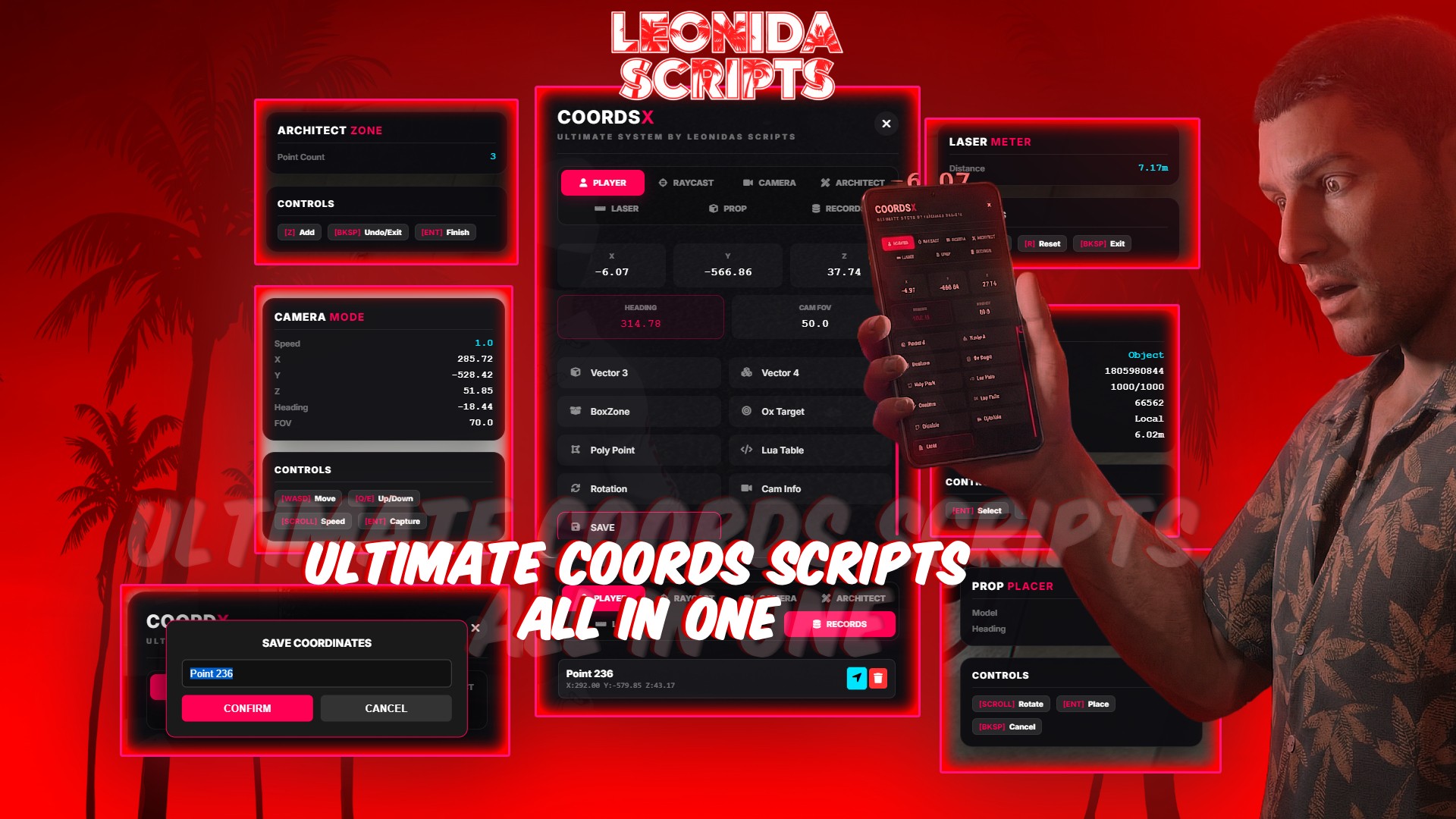
Leonida Coords Script is not just a coordinate grabber; it is a comprehensive, all-in-one development suite designed for FiveM server owners, developers, and map makers. Whether you are setting up complex PolyZones, placing Props with precision, measuring distances for scripts, or grabbing Entity Data on the fly, Leonida Coords Script does it all through a stunning, modern Glassmorphism UI.
Completely Standalone (works with ESX, QBCore, vMenu, or any custom framework).
🔥 Key Features
📐 Visual Architect Mode (PolyZone Creator)
Forget calculating points blindly!
Visual Walls: See exactly where your zone boundaries are with real-time laser walls.
Loop Closing: Automatically previews how the zone will close.
Export Ready: Generates ready-to-use PolyZone code upon completion.
Undo/Redo: Made a mistake? Press Backspace to remove the last point.
🔫 Advanced Raycast & Entity Inspector
Point at anything, get everything.
Entity Data: View Hash, Model Name, Network ID, Entity ID, Health, Max Health.
Vehicle Stats: See real-time speed (km/h) and vehicle class.
Bone Snapping: Automatically detects and snaps to specific bones (e.g., chassis, door_dside_f) for precision targeting.
Distance: Shows the exact distance from your player to the target.
📏 Laser Meter (Distance Measure)
Need to know if a player is close enough to an NPC?
Set Point A and Point B in the 3D world.
Get the precise distance (in meters) displayed instantly.
Visualizes the path with a 3D laser beam.
📦 Prop Placer (Visual Preview)
Don't restart your server to check a prop rotation!
Input & Spawn: Type any prop name (e.g., v_ilev_bench01) in the UI.
Live Editing: The prop spawns in "Ghost Mode" attached to your controls.
Rotate & Place: Use your scroll wheel to adjust the heading perfectly.
Code Generation: Press Enter to get the exact CreateObject code with your chosen coords and heading.
🎥 Camera Mode (NoClip)
Fly freely to get coordinates in hard-to-reach places.
Adjust flight speed with the scroll wheel.
Capture coordinates or camera setup data (SetCamCoord, SetCamRot) instantly.
💾 In-Game Database & Teleport
Save Locations: Save your current position with a custom name directly in the menu.
Teleport: Click any saved location to instantly teleport there.
Persistent: Data is saved via JSON server-side, so your locations remain after restarts.
📋 One-Click Copy Formats
Copy exactly what you need for your script:
vector3(x, y, z)
vector4(x, y, z, h)
{ x=..., y=..., z=..., h=... } (Lua Table)
BoxZone & Ox_Target Configs
PolyZone Points
JSON Format
Heading Only
Camera Setup Code
⚙️ Configuration & Localization
Fully Translatable: Every single text, button, and label in the UI can be translated via Config.lua.
Permission System: Restrict access to specific Steam Hexes, Licenses, or allow everyone (Configurable).
Standalone: No dependencies. Drop it in, and it works.
🎮 Controls
Open Menu: /coords (Configurable)
Raycast/Laser: Z to add point, Backspace to undo/exit, Enter to confirm.
Camera: WASD to move, Q/E for altitude, Scroll for speed.
Prop: Scroll to rotate, Enter to place.
🚀 Why Choose Leonida Coords Script?
This tool was built by developers for developers. It eliminates the tedious parts of scripting and mapping, saving you hours of work. With its polished UI and bug-free experience, it's the only coordinate tool you'll ever need.
Download Now and get coords so easy!